prichina
senior
prichina's setup
- Processor & Cooler
- i5 7500 | Z600 + NF-A15 Noctua
- Motherboard
- Gigabyte H110 D3A
- Storage
- Toshiba 128GB SSD M2 2280 SATA | Crucial M4 128GB | Samsung SSD 870 QVO 1TB | SK Hynix SSD 500GB | 1.5 TB Seagate во Cooler Master Xport 351 | WD Elements 1TB
- PSU
- EVGA G2 1000
- RAM
- 2x8GB DDR4-2666
- Video card
- MSI RTX 3070 VENTUS 3X OC
- Case
- HAF 922 | Fan Control (PWM) DeepCool Rockman
- Mouse
- Razer Viper Ultimate | Gamepad's: 2xRumblepad 2 (wireless) + 1x Rumblepad 2(with wire) / Wireless kombo Тастатура + Mаус од A4Tech
- Keyboard
- A4Tech Wireless
- Audio
- X-FI Platinum + Remote | Tannoy Mercury F1 Custom | Marantz PM-44 SE mkII | Audio Technica m40fs
- Monitor
- Dell U2412M
- OS
- Windows 10 pro
Panasonic 2012 Plasma - 2500Hz FFD Explanation Attempt
Panasonic now have a new “marketing number” : 2000Hz and 2500Hz Focused Field Drive. I’m trying to understand what that mean and here is the result of my investigation.
Let’s get back to Plasma 101.
To display a frame, Plasma do temporal dithering, also call sub-fields. We’ll simplify to a gray scale image for the following explanation.
Let’s say a pixel can either be black or lit. No intermediary shades of gray. To achieve a 50% lit pixel, the plasma can blink this pixel. And this is exactly what it does with sub-fields: it blinks its pixels 600 times a second = 600Hz Sub Field Drive. For a 60Hz source material that’s 10 blinking. With binary pixels (white or black), it means you can display 11 shades of gray (from black, where your pixel is lit during 0 subfields to white, where your pixel is lit during all 10 subfields and 9 intermediary shades of gray).
The problem is that to display your image, you need to wait for the whole 10 sub-fields. So you only have an actual 60Hz frame rate. It is a perfect 60Hz with no motion blur. A plasma pixel can change its state from black to lit in less than a sub-field duration - 1.66ms - while most LCD pixel response time is in the 4-12ms. Hence the transition from one image to another will be almost instantaneous with no requirement for the special tricks used by LCDs. The problem is that you have a hard time going beyond 60Hz. You can reduce the number of sub-fields, down to 5 for true 120Hz. However, this reduces your color accuracy: from 11 shades of gray, your are down to only 6. However, if your pixel can ALSO display different shades of gray itself, you can retain accuracy. With 3 shades (black, 50% gray, white), you revert to 11 shades of gray while retaining a perfect 120Hz refresh rate and still no motion blur.
You can also increase the color accuracy with sub-fields of different duration. By using a power of 2 scale for your subfields duration, with only 5 subfields and a binary pixel, you can go from 6 shades to 2^(5-1)+1=17 shades. Subfield duration would be 1, 1, 2, 4 and 8. Your final pixel brightness can range from 0 to 16. To display a level 8 gray, just lit your pixel during the last subfield. For a level 3 gray, lit the pixel during the 1st and 3rd subfield. And so on. In Panasonic Plasmas, subfields can range from 0.005ms to 0.4ms.
The problem is that it stills requires the full frame duration and all the intermediary sub-fields to display your image.
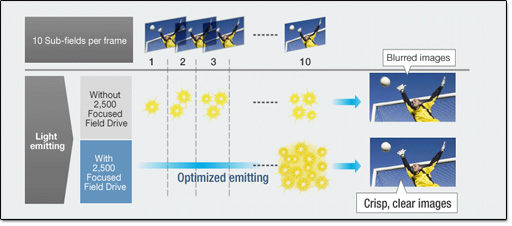
So we have 600Hz subfields, different duration for subfields and pixels that support multiple shades of gray. You can combine those 3 facts in numerous technics. For example, to display a 50% gray, what’s the best : light your pixels at 50% gray during all subfields ? Or light them at 100% on half the subfields ?
We saw that some subfields can be much longer than others. Let’s say one last as long as all the others. On our example, the last subfield has a relative duration of 8. If your image is only filled with 50% gray, you can display it in a single long subfield: you lit your pixels at 100% brightness during the last subfield. You still have a 60 or 120Hz refresh rate but your image is actually flashed on the screen during only one single subfield ! There is even less motion blur since frames are separated from each other by 4 (120Hz) to 9 (60Hz) fully black subfields. There is no “last subfield” of previous image very close to the “first subfield” of the following image.
Now imagine your pixels are very advanced and can display a whole palette of shades. With a single long subfield, you can display a whole image with details in shades of gray, however limited from 0 to 50% brigthness.
And now, let’s say your pixels are really really advanced and much brighter than what you could manage on the previous generation. Instead of increasing the display overall brightness or reducing the power consumption, you focus this increased brightness in trying to achieve this “single subfield”. You are then able to display an image in a single subfield, with the same brightness and color accuracy a previous generation required numerous subfields to achieve.
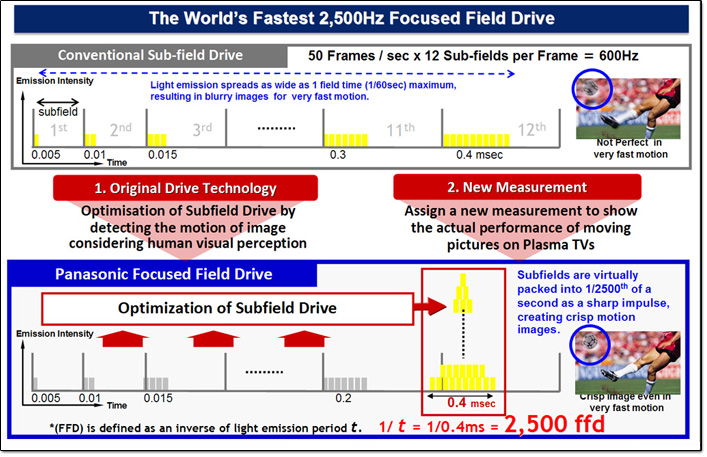
This is my understanding of what Panasonic calls Focused Field Drive.
I’m not sure if subfields are completly gone: either Panasonic managed to achieve the exact same color accuracy and brightness with a single subfield, or it will just try to do so most of the time but depending on the actual image content, it might need to revert to “traditionnal” subfields for added brightness and accuracy. You still can display 60Hz or 120Hz true images (from an actual 60Hz or 120Hz source or interpolated from a lower frame rate source). But now an image is displayed in a mere 0.4ms and not spread across multiple subfields that could span to the whole frame duration.
In Panasonic 2012 lineup, your plasma will try to fit (or “focus” as they say) your image in a single 0.4ms sub-field, based on overall brightness and required color accuracy. They call this Focused Field Drive (FFD).
On a “marketing bullshit” point of view, this would be a regression: you lose the 600 subfields to “gain” a single Focus Field, synchronized with the source much lower refresh rate. Against a “240 SPS” or a “XR960” LCD, that’s an issue. For GT50 and VT50, you have a 0.4ms subfield. If you convert this number to Hertz, you get 2500Hz which sounds much better than the highest phony number LCD manufacturers are advertizing. Those Hz are not linked to actual number of images displayed but to the panel reactivity.
2012 Plasma line-up uses the 15th generation panel from Panasonic. It is claimed to support 24576 shades (Panasonic calls them “steps of gradation”) while the 14th generation from 2011 supported “only” 6144 shades. The 2012 lineup is also claimed to be much brighter. Those increases in gradation and brightness are behind the introduction of Focus Field Drive.
Извор:
http://paytherant.tumblr.com/post/20057368974/panasonic-2012-plasma-2500hz-ffd-explanation-attempt
Panasonic now have a new “marketing number” : 2000Hz and 2500Hz Focused Field Drive. I’m trying to understand what that mean and here is the result of my investigation.
Let’s get back to Plasma 101.
To display a frame, Plasma do temporal dithering, also call sub-fields. We’ll simplify to a gray scale image for the following explanation.
Let’s say a pixel can either be black or lit. No intermediary shades of gray. To achieve a 50% lit pixel, the plasma can blink this pixel. And this is exactly what it does with sub-fields: it blinks its pixels 600 times a second = 600Hz Sub Field Drive. For a 60Hz source material that’s 10 blinking. With binary pixels (white or black), it means you can display 11 shades of gray (from black, where your pixel is lit during 0 subfields to white, where your pixel is lit during all 10 subfields and 9 intermediary shades of gray).
The problem is that to display your image, you need to wait for the whole 10 sub-fields. So you only have an actual 60Hz frame rate. It is a perfect 60Hz with no motion blur. A plasma pixel can change its state from black to lit in less than a sub-field duration - 1.66ms - while most LCD pixel response time is in the 4-12ms. Hence the transition from one image to another will be almost instantaneous with no requirement for the special tricks used by LCDs. The problem is that you have a hard time going beyond 60Hz. You can reduce the number of sub-fields, down to 5 for true 120Hz. However, this reduces your color accuracy: from 11 shades of gray, your are down to only 6. However, if your pixel can ALSO display different shades of gray itself, you can retain accuracy. With 3 shades (black, 50% gray, white), you revert to 11 shades of gray while retaining a perfect 120Hz refresh rate and still no motion blur.
You can also increase the color accuracy with sub-fields of different duration. By using a power of 2 scale for your subfields duration, with only 5 subfields and a binary pixel, you can go from 6 shades to 2^(5-1)+1=17 shades. Subfield duration would be 1, 1, 2, 4 and 8. Your final pixel brightness can range from 0 to 16. To display a level 8 gray, just lit your pixel during the last subfield. For a level 3 gray, lit the pixel during the 1st and 3rd subfield. And so on. In Panasonic Plasmas, subfields can range from 0.005ms to 0.4ms.
The problem is that it stills requires the full frame duration and all the intermediary sub-fields to display your image.
So we have 600Hz subfields, different duration for subfields and pixels that support multiple shades of gray. You can combine those 3 facts in numerous technics. For example, to display a 50% gray, what’s the best : light your pixels at 50% gray during all subfields ? Or light them at 100% on half the subfields ?
We saw that some subfields can be much longer than others. Let’s say one last as long as all the others. On our example, the last subfield has a relative duration of 8. If your image is only filled with 50% gray, you can display it in a single long subfield: you lit your pixels at 100% brightness during the last subfield. You still have a 60 or 120Hz refresh rate but your image is actually flashed on the screen during only one single subfield ! There is even less motion blur since frames are separated from each other by 4 (120Hz) to 9 (60Hz) fully black subfields. There is no “last subfield” of previous image very close to the “first subfield” of the following image.
Now imagine your pixels are very advanced and can display a whole palette of shades. With a single long subfield, you can display a whole image with details in shades of gray, however limited from 0 to 50% brigthness.
And now, let’s say your pixels are really really advanced and much brighter than what you could manage on the previous generation. Instead of increasing the display overall brightness or reducing the power consumption, you focus this increased brightness in trying to achieve this “single subfield”. You are then able to display an image in a single subfield, with the same brightness and color accuracy a previous generation required numerous subfields to achieve.
This is my understanding of what Panasonic calls Focused Field Drive.
I’m not sure if subfields are completly gone: either Panasonic managed to achieve the exact same color accuracy and brightness with a single subfield, or it will just try to do so most of the time but depending on the actual image content, it might need to revert to “traditionnal” subfields for added brightness and accuracy. You still can display 60Hz or 120Hz true images (from an actual 60Hz or 120Hz source or interpolated from a lower frame rate source). But now an image is displayed in a mere 0.4ms and not spread across multiple subfields that could span to the whole frame duration.
In Panasonic 2012 lineup, your plasma will try to fit (or “focus” as they say) your image in a single 0.4ms sub-field, based on overall brightness and required color accuracy. They call this Focused Field Drive (FFD).
On a “marketing bullshit” point of view, this would be a regression: you lose the 600 subfields to “gain” a single Focus Field, synchronized with the source much lower refresh rate. Against a “240 SPS” or a “XR960” LCD, that’s an issue. For GT50 and VT50, you have a 0.4ms subfield. If you convert this number to Hertz, you get 2500Hz which sounds much better than the highest phony number LCD manufacturers are advertizing. Those Hz are not linked to actual number of images displayed but to the panel reactivity.
2012 Plasma line-up uses the 15th generation panel from Panasonic. It is claimed to support 24576 shades (Panasonic calls them “steps of gradation”) while the 14th generation from 2011 supported “only” 6144 shades. The 2012 lineup is also claimed to be much brighter. Those increases in gradation and brightness are behind the introduction of Focus Field Drive.
Извор:
http://paytherant.tumblr.com/post/20057368974/panasonic-2012-plasma-2500hz-ffd-explanation-attempt